
项目介绍
ChatWiki 把文档知识库、模型问答、工作流与公众号等消息渠道连接起来。它使用数据库、缓存、队列、抓取、转换和应用等多个服务,适合需要资料问答与渠道接入的场景。部署时使用完整官方项目,不能只运行一个应用镜像。
知识库负责组织资料,模型服务负责生成回复,工作流与渠道负责把能力交给用户。多组件部署应从完整官方项目开始。
适合资料问答和公众号等渠道助手。先验证网页中的解析、检索与引用,再接渠道,能减少同时排查多个环节。
核心功能
| 功能 | 作用与使用方式 |
|---|---|
| 资料导入 | 使用支持的文件与链接 |
| 知识问答 | 核对召回片段与答案 |
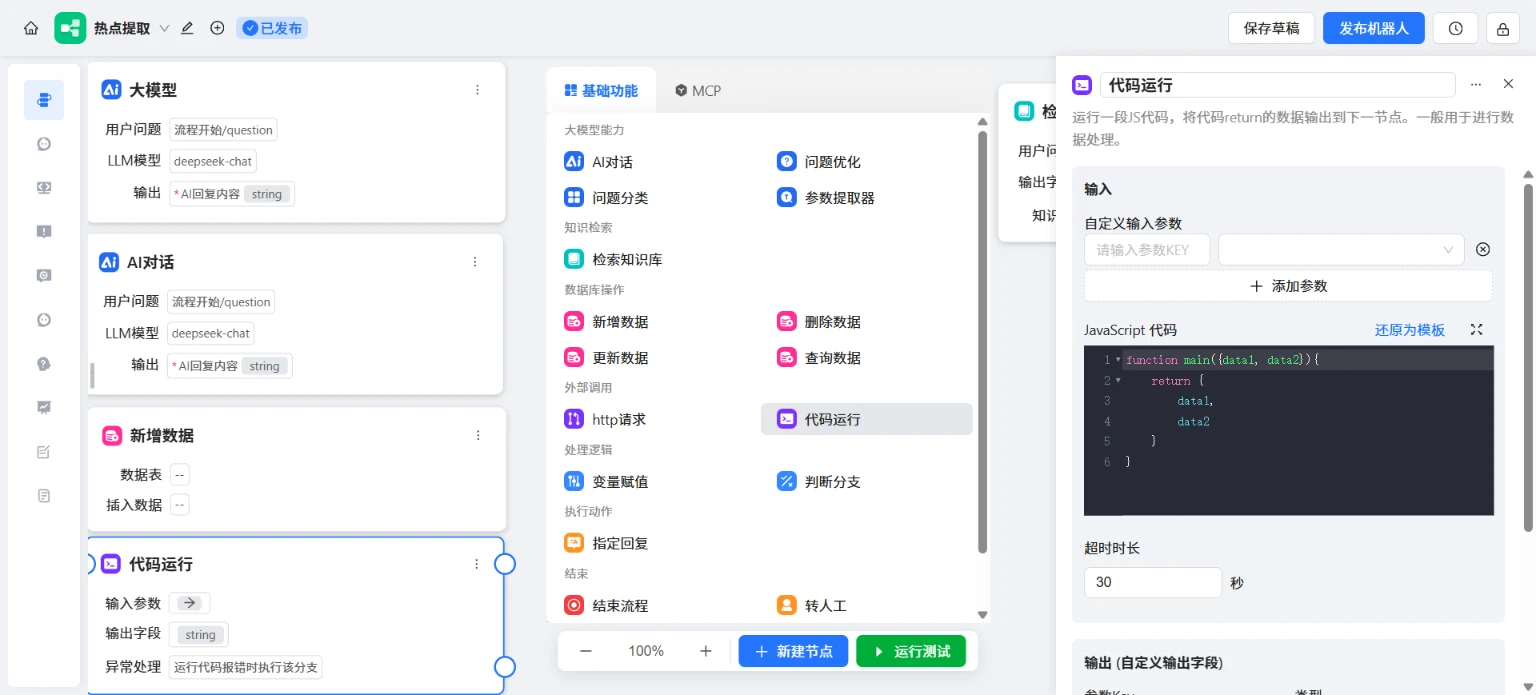
| 工作流 | 组织模型和业务步骤 |
| 渠道接入 | 按账号权限连接消息平台 |
| 权限管理 | 复查不同账号可见资料 |
界面展示
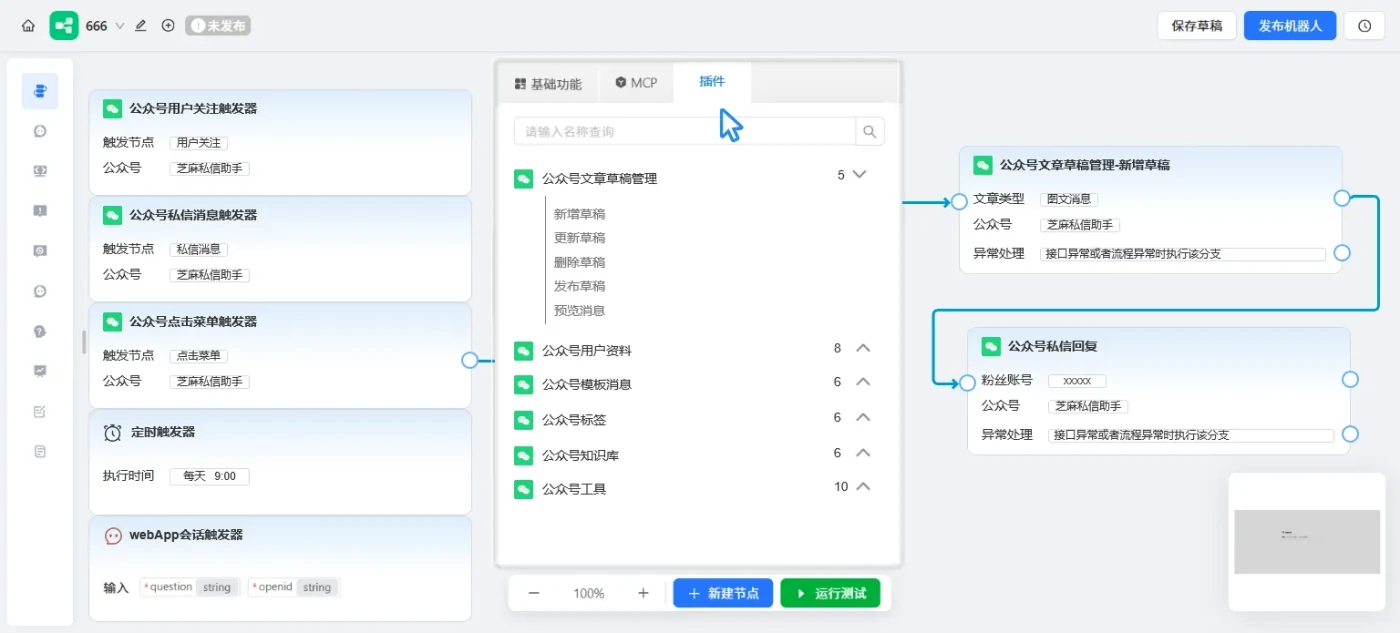
图 1:官方仓库提供的项目示意图,用于说明功能与布局。
项目信息
| 项目 | 说明 |
|---|---|
| 类型 | 项目指南 |
| 分类 | 知识与效率 |
| 项目仓库 | zhimaAi/chatwiki |
| 整理日期 | 2026-11-14 |
群晖完整源码与 Compose 安装
本方案按当前官方仓库的完整多服务结构安装,面向 x86-64 群晖新装。先在套件中心准备 Container Manager、Git 与 Python 3。服务端的预编译程序、前端资源、Nginx 配置和 Compose 都来自同一份源码,不能只复制一个镜像名启动。
1. 获取完整项目
通过自己的 SSH 账号登录群晖后执行。下面会在发现已有 source 时停止,已有 ChatWiki 数据不能用新装步骤覆盖。
sudo -i
mkdir -p /volume1/docker/chatwiki
cd /volume1/docker/chatwiki
test ! -e source || { echo "source 已存在,请检查原安装,不重复初始化"; exit 1; }
git clone https://github.com/zhimaAi/chatwiki.git source
cd source/docker
test -f .env
test -f docker-compose.yml
test -f ../build/crawler
2. 生成自己的密码并同步配置
官方 .env 与各组件 INI 都有数据库连接配置,必须一起更新;只改数据库容器密码会导致业务服务连接失败。以下命令仅用于这份刚克隆的新项目,生成随机密码并同步各组件连接参数。
python3 - <<'CHATWIKI_CONFIG'
import configparser,os,re,secrets
from pathlib import Path
env=Path('.env')
assert not Path('.site-initialized').exists(), '本项目已初始化,保留现有密码'
updates={
    'REDIS_PASSWORD':secrets.token_hex(24),
    'POSTGRES_PASSWORD':secrets.token_hex(24),
    'WECHAT_ARTICLE_CRAWLER_API_TOKEN':secrets.token_hex(32),
    'COMPOSE_PROJECT_NAME':'chatwiki',
}
text=env.read_text(encoding='utf8')
for key,value in updates.items():
    text,count=re.subn(r'^'+re.escape(key)+r'=.*$',key+'='+value,text,flags=re.M)
    if not count:text+='\n'+key+'='+value+'\n'
env.write_text(text,encoding='utf8')
os.chown(env,10001,10001);env.chmod(0o640)
for file in Path('../configs').rglob('*.ini'):
    cfg=configparser.ConfigParser(interpolation=None,strict=False)
    cfg.optionxform=str
    cfg.read(file,encoding='utf8')
    for section,password in [('redis',updates['REDIS_PASSWORD']),('postgres',updates['POSTGRES_PASSWORD'])]:
        if cfg.has_section(section):cfg.set(section,'password',password)
    with file.open('w',encoding='utf8') as stream:cfg.write(stream)
    os.chown(file,10001,10001);file.chmod(0o640)
for folder in ['../internal/app/code_run/logs','../clawbot/working_dir']:
    p=Path(folder);p.mkdir(parents=True,exist_ok=True);os.chown(p,10001,10001)
Path('.site-initialized').touch()
CHATWIKI_CONFIG
.env 与 configs 目录包含本机生成的密码,私下保存,不公开上传。第一次启动后也不要重新初始化数据库密码;升级沿用这份配置。
3. 完整 Compose
配置文件已经随仓库下载到 /volume1/docker/chatwiki/source/docker/docker-compose.yml。下面列出配套完整结构,方便核对服务、端口和持久化目录。相对路径 ../ 指向 /volume1/docker/chatwiki/source;不能把文件移到别的目录后仍沿用这些相对挂载。
services:
  chatwiki_redis_service:
    image: registry.cn-hangzhou.aliyuncs.com/chatwiki/redis:5.0
    container_name: chatwiki_redis_service
    ports:
      - ${REDIS_PORT}:6379
    command: redis-server --appendonly yes --requirepass ${REDIS_PASSWORD}
    volumes:
      - ../volumes/redis_data:/data
    networks:
      - chatwiki_network
    restart: always
    environment:
      GODEBUG: "${CHATWIKI_GODEBUG:-multipathtcp=0}"
      TZ: ${TIMEZONE}

  chatwiki_crawler:
    image: registry.cn-hangzhou.aliyuncs.com/chatwiki/playwright:20261105
    container_name: chatwiki_crawler
    restart: always
    environment:
      GODEBUG: "${CHATWIKI_GODEBUG:-multipathtcp=0}"
      TZ: ${TIMEZONE}
      PRODUCTION: "true"
    volumes:
      - ../:/var/www/crawler/
    working_dir: /var/www/crawler
    command: ./build/crawler
    networks:
      - chatwiki_network
    ports:
      - ${CRAWLER_PORT}:3800

  chatwiki_converter:
    image: registry.cn-hangzhou.aliyuncs.com/chatwiki/converter:1.7
    privileged: true
    container_name: chatwiki_converter
    restart: always
    environment:
      GODEBUG: "${CHATWIKI_GODEBUG:-multipathtcp=0}"
      TZ: ${TIMEZONE}
    networks:
      - chatwiki_network

  chatwiki_postgres_service:
    container_name: chatwiki_postgres_service
    image: registry.cn-hangzhou.aliyuncs.com/chatwiki/postgres:20261012
    environment:
      GODEBUG: "${CHATWIKI_GODEBUG:-multipathtcp=0}"
      TZ: ${TIMEZONE}
      POSTGRES_USER: ${POSTGRES_USER}
      POSTGRES_PASSWORD: ${POSTGRES_PASSWORD}
      POSTGRES_DB: ${POSTGRES_DB}
    volumes:
      - ../volumes/postgres_data:/var/lib/postgresql/data
    ports:
      - ${POSTGRES_PORT}:5432
    networks:
      - chatwiki_network
    restart: always
    healthcheck:
      test: [ "CMD-SHELL", "pg_isready -U ${POSTGRES_USER} -d ${POSTGRES_DB} -h localhost || exit 1" ]
      interval: 1s
      timeout: 10s
      retries: 20
      start_period: 15s

  chatwiki_go_nsq_service:
    build:
      context: .
      dockerfile: DockerfileGoNsq
    container_name: chatwiki_go_nsq_service
    image: registry.cn-hangzhou.aliyuncs.com/chatwiki/go_nsq_service:20260506
    working_dir: /var/www/go-nsq
    ports:
      - ${NSQADMIN_PORT}:4171
    networks:
      - chatwiki_network
    restart: always
    environment:
      GODEBUG: "${CHATWIKI_GODEBUG:-multipathtcp=0}"
      TZ: ${TIMEZONE}
    stdin_open: true
    tty: true
    command:
      - /bin/bash
      - -c
      - |
        supervisord
        /bin/bash

  chatwiki_go_push_service:
    build:
      context: .
      dockerfile: DockerfileGoPush
    container_name: chatwiki_go_push_service
    image: registry.cn-hangzhou.aliyuncs.com/chatwiki/go_push_service:20251103
    volumes:
      - ../:/var/www/chatwiki/
    working_dir: /var/www/chatwiki
    ports:
      - ${PUSH_SERVICE_PORT}:24529
    networks:
      - chatwiki_network
    restart: always
    depends_on:
      - chatwiki_redis_service
      - chatwiki_postgres_service
      - chatwiki_go_nsq_service
    environment:
      GODEBUG: "${CHATWIKI_GODEBUG:-multipathtcp=0}"
      TZ: ${TIMEZONE}
    stdin_open: true
    tty: true
    command:
      - /bin/bash
      - -c
      - |
        supervisord
        /bin/bash

  chatwiki_go_core_service:
    build:
      context: .
      dockerfile: DockerfileGoCore
    container_name: chatwiki_go_core_service
    image: registry.cn-hangzhou.aliyuncs.com/chatwiki/go_core_service:20260730
    volumes:
      - ../:/var/www/chatwiki/
      - ../volumes/nginx_logs:/var/log/nginx/
    working_dir: /var/www/chatwiki
    extra_hosts:
      - "host.docker.internal:host-gateway"
    ports:
      - ${CHAT_SERVICE_PORT}:8080
      - ${H5_SERVICE_PORT}:8081
      - ${PC_SERVICE_PORT}:8082
    networks:
      - chatwiki_network
    restart: always
    depends_on:
      chatwiki_redis_service:
        condition: service_started
      chatwiki_postgres_service:
        condition: service_started
      chatwiki_go_nsq_service:
        condition: service_started
      chatwiki_websocket:
        condition: service_started
    environment:
      GODEBUG: "${CHATWIKI_GODEBUG:-multipathtcp=0}"
      TZ: ${TIMEZONE}
      HTTP_PROXY: ${PROXY:-}
      HTTPS_PROXY: ${PROXY:-}
    stdin_open: true
    tty: true
    command:
      - /bin/bash
      - -c
      - |
        supervisord
        nginx
        /bin/bash

  chatwiki_websocket:
    image: registry.cn-hangzhou.aliyuncs.com/chatwiki/ubuntu:22.04
    container_name: chatwiki_websocket
    ports:
      - ${WS_SERVICE_PORT}:24628
    networks:
      - chatwiki_network
    volumes:
      - ../:/var/www/chatwiki/
    working_dir: /var/www/chatwiki
    command: ./build/websocket --IsDev=false
    restart: always
    depends_on:
      - chatwiki_go_nsq_service
    environment:
      GODEBUG: "${CHATWIKI_GODEBUG:-multipathtcp=0}"
      TZ: ${TIMEZONE}

  chatwiki_code_run:
    image: registry.cn-hangzhou.aliyuncs.com/chatwiki/code_run_secure:20261030
    container_name: chatwiki_code_run
    networks:
      - chatwiki_network
    volumes:
      - ../build/code_run:/var/www/chatwiki/build/code_run:ro
      - ../internal/app/code_run/logs:/var/www/chatwiki/internal/app/code_run/logs:rw
    user: "10001:10001"
    read_only: true
    init: true
    cap_drop:
      - ALL
    security_opt:
      - no-new-privileges:true
    working_dir: /var/www/chatwiki
    command: ./build/code_run --IsDev=false
    restart: always
    environment:
      GODEBUG: "${CHATWIKI_GODEBUG:-multipathtcp=0}"
      TZ: ${TIMEZONE}
    deploy:
      resources:
        limits:
          pids: 128

  chatwiki_gen_thumbnail:
    image: registry.cn-hangzhou.aliyuncs.com/chatwiki/ubuntu:22.04
    container_name: chatwiki_gen_thumbnail
    networks:
      - chatwiki_network
    volumes:
      - ../:/var/www/chatwiki/
    working_dir: /var/www/chatwiki
    command: ./build/gen_thumbnail --IsDev=false
    restart: always
    environment:
      GODEBUG: "${CHATWIKI_GODEBUG:-multipathtcp=0}"
      TZ: ${TIMEZONE}
  chatwiki_plugin:
    image: registry.cn-hangzhou.aliyuncs.com/chatwiki/plugin:1.0
    container_name: chatwiki_plugin
    networks:
      - chatwiki_network
    volumes:
      - ../:/var/www/chatwiki/
    working_dir: /var/www/chatwiki
    command: ./build/plugin --IsDev=false
    restart: always
    environment:
      GODEBUG: "${CHATWIKI_GODEBUG:-multipathtcp=0}"
      TZ: ${TIMEZONE}
    healthcheck:
      disable: true
    logging:
      options:
        mode: non-blocking
        max-size: "50m"
        max-file: "10"

  chatwiki_file_transfer:
    image: registry.cn-hangzhou.aliyuncs.com/chatwiki/file_transfer:20251223
    container_name: chatwiki_file_transfer
    networks:
      - chatwiki_network
    working_dir: /app
    command: ./file_transfer
    tty: true
    restart: unless-stopped
    environment:
      GODEBUG: "${CHATWIKI_GODEBUG:-multipathtcp=0}"
      TZ: ${TIMEZONE}
    ports:
      - ${FILE_TRANSFER_SERVICE_PORT}:8080

  chatwiki_wechat_article_crawler:
    privileged: true
    image: registry.cn-hangzhou.aliyuncs.com/chatwiki/wechat_article_crawler:0.2
    container_name: chatwiki_wechat_article_crawler
    networks:
      - chatwiki_network
    restart: unless-stopped
    ports:
      - ${WECHAT_ARTICLE_CRAWLER_PORT}:8000
    environment:
      GODEBUG: "${CHATWIKI_GODEBUG:-multipathtcp=0}"
      TZ: ${TIMEZONE}
      API_TOKEN: ${WECHAT_ARTICLE_CRAWLER_API_TOKEN}
      SOCKS_PROXY_HOST: ${WECHAT_ARTICLE_CRAWLER_SOCKS_PROXY_HOST}
      SOCKS_PROXY_PORT: ${WECHAT_ARTICLE_CRAWLER_SOCKS_PROXY_PORT}
      SOCKS_PROXY_USERNAME: ${WECHAT_ARTICLE_CRAWLER_SOCKS_PROXY_USERNAME}
      SOCKS_PROXY_PASSWORD: ${WECHAT_ARTICLE_CRAWLER_SOCKS_PROXY_PASSWORD}
    deploy:
      resources:
        limits:
          cpus: '2'
          memory: 1G

  chatwiki_llm_runner:
    image: registry.cn-hangzhou.aliyuncs.com/chatwiki/llm_runner:20260720
    container_name: chatwiki_llm_runner
    networks:
      - chatwiki_network
    volumes:
      - ../build/llm_runner:/build/llm_runner:ro
      - ../clawbot/skills_public:/workspace/clawbot/skills_public:ro
      - ../clawbot/skills_robot:/workspace/clawbot/skills_robot:ro
      - ../clawbot/skills_system:/workspace/clawbot/skills_system:ro
      - ../clawbot/working_dir:/workspace/clawbot/working_dir:rw
    working_dir: /workspace
    command: /build/llm_runner
    restart: always
    environment:
      GODEBUG: "${CHATWIKI_GODEBUG:-multipathtcp=0}"
      TZ: ${TIMEZONE}
      LLM_RUNNER_COMMAND_TIMEOUT: 1h
      CHATWIKI_APIKEY: ${CHATWIKI_APIKEY:-}
    ports:
      - ${LLM_RUNNER_PORT}:9000
    user: "10001:10001"
    read_only: true
    privileged: false
    cap_drop:
      - ALL
    security_opt:
      - no-new-privileges:true
    stdin_open: true
    tty: true
    ulimits:
      nofile:
        soft: 1024
        hard: 1024
      nproc: 512
      fsize: 104857600
    tmpfs:
      - /tmp:rw,noexec,nosuid,size=512m
    deploy:
      resources:
        limits:
          pids: 512
          cpus: '2'
          memory: 4G

networks:
  chatwiki_network:
    driver: bridge
4. 检查并启动
cd /volume1/docker/chatwiki/source/docker
docker compose -f docker-compose.yml config --quiet
docker compose -f docker-compose.yml pull
docker compose -f docker-compose.yml up -d
docker compose -f docker-compose.yml ps
docker compose -f docker-compose.yml logs --tail=150
打开 http://群晖IP:18080。官方首次管理员为 admin,初始密码为 chatwiki.com@123,登录后立即修改,再配置自己的模型服务。默认页面与回调另使用 18081、18082、18083 等端口,实际以本机 .env 为准。公网访问先设置域名、HTTPS 和访问控制,数据库及内部组件端口不要直接对公网开放。
首次使用与验证
先在后台新增自己的对话模型和 Embedding 模型,新建一个测试知识库并上传两页资料。等待解析和向量化完成,再提问一个答案明确存在于文档中的问题,检查引用是否对应。公众号和其他渠道在基础问答可用后再逐项接入,分别测试授权、回调与实际收到的消息。
常见问题
- 容器运行但业务报数据库错误:核对 .env 与 configs 中对应 Redis/PostgreSQL 密码是否一致,查看业务容器日志,不重新随机生成密码。
- exec format error:检查 NAS 架构与仓库预编译程序是否匹配,ARM 不能直接复用这份 x86-64 新装步骤。
- 页面打不开或回调失败:分别检查 18080 管理入口、对应渠道服务端口、DSM 防火墙和反向代理 WebSocket 设置。
- 权限错误:code_run 与 llm_runner 以 10001:10001 运行,只检查对应日志与 working_dir 权限,不为整个项目开启 777。
更新与备份
备份 .env、configs、volumes、用户上传资料和自行修改的配置。数据库先做逻辑备份,或停止整个项目后备份完整数据目录。记录当前源码提交和镜像版本;升级时先比较上游配置与构建产物,再拉取配套镜像,不重复执行新装的密码初始化命令。
cd /volume1/docker/chatwiki/source/docker
docker compose -f docker-compose.yml stop
docker compose -f docker-compose.yml start
docker compose -f docker-compose.yml logs --tail=100
停止与恢复不删除数据;卸载容器时不要附加 -v。源码与 .env 有本地调整时,升级先比较差异,不使用强制重置覆盖配置。